Appearance
Headphone EQ Preferences
Different headphones have different frequency responses, and that response colours every binaural mix. The Headphone EQ panel lets you load a measured compensation curve for your specific headphones — drawn from a curated catalogue baked into the engine — and optionally layer a five-band tone stack on top for taste. For background on what headphone compensation does and why it matters, see Headphone EQ.
What this panel controls
The Headphone EQ chain runs only on the Binaural and Stereo outputs — the modes that play to headphones. While you monitor Multichannel, the panel is still configurable but a banner reads EQ inactive in Multichannel. In Apple Spatial Audio, Apple's own renderer handles output and the EQ chain is bypassed.
The curves are calibrated against a diffuse-field reference, so the pane suggests pairing them with the Orbit Reference HRTF profile in Audio & Monitoring to keep the compensation honest.
On / off
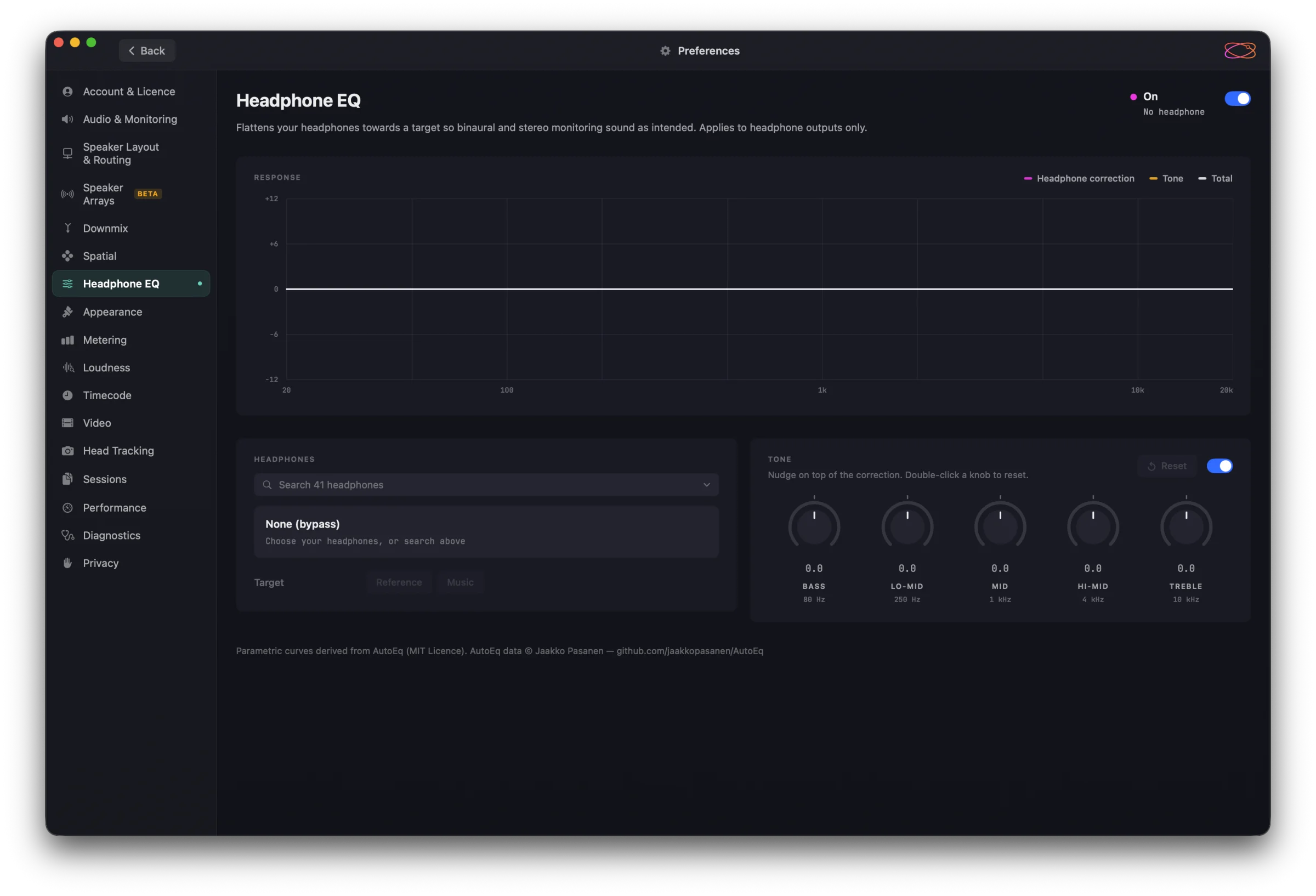
The switch at the top right of the pane turns the whole chain — profile, target curve and tone — on or off, beside a one-line summary of what's applied (headphone, target, preamp, and whether the tone is adjusted). On by default.
Headphones
Choose your headphones from the search field (Search 41 headphones): type a name or maker to narrow the list. Or click the card below it, which shows the chosen headphone, for the full list by category. Once a headphone is chosen, a None (bypass) button beside it turns the correction off again.
The first entry is None (bypass) — pick this for headphones that aren't in the catalogue, or when you want to monitor without compensation. Loading a profile applies its parametric biquad chain (a measured frequency-response compensation) on top of the binaural feed.
Available headphones
Every entry below offers both Reference and Music target curves. Listed in three categories matching the picker's grouping; pick whichever entry matches your headphones, or None (bypass) if your model isn't here.
Catalogue last updated: 2026-04-22.
Pro Open-Back
- AKG K701
- AKG K702
- AKG K712 Pro
- Audeze LCD-5
- Audeze LCD-X (2021)
- Audeze MM-500
- Beyerdynamic DT 1990 Pro (analytic)
- Beyerdynamic DT 880 Pro (250Ω)
- Beyerdynamic DT 990 Pro (250Ω)
- Focal Clear
- Focal Utopia (2022)
- HiFiMAN Ananda
- HiFiMAN Arya (Stealth Magnet)
- HiFiMAN Edition XS
- HiFiMAN HE1000se
- HiFiMAN Sundara (post-2020)
- Meze Elite
- Neumann NDH 30
- Sennheiser HD 600
- Sennheiser HD 650
- Sennheiser HD 660 S
- Sennheiser HD 800 S
- Sony MDR-MV1
Pro Closed-Back
- AKG K371
- Audeze LCD-XC
- Audio-Technica ATH-M40x
- Audio-Technica ATH-M50x
- Beyerdynamic DT 770 Pro (250Ω)
- Beyerdynamic DT 770 Pro (80Ω)
- Dan Clark Audio Stealth
- Sennheiser HD 280 Pro
- Shure SRH1540
- Shure SRH840A
- Sony MDR-7506
- Sony MDR-M1ST
- Steven Slate VSX (Original)
Consumer
- Apple AirPods Max
- Apple AirPods Pro (2nd gen)
- Bose QuietComfort Ultra
- Sennheiser Momentum 4 Wireless
- Sony WH-1000XM5
Target curve
Every profile offers two target curves: Reference — the Harman over-ear 2018 target, AutoEq's default, with a slight bass shelf and gently falling treble — and Music, with a flatter treble and a gentler bass lift. The Target buttons are always shown; they're disabled while None (bypass) is selected.
Preamp
A read-only figure: the gain applied before the EQ so the total stays below unity gain. Computed from the profile's measured peaks; you can't edit it directly. Lower values (−6 dB or below) on a profile usually mean the headphone has a sharp peak somewhere that needed cutting.
User tone stack
Layered on top of the AutoEq chain — a five-band parametric EQ for personal taste adjustments.
The Tone card nudges the sound on top of the correction. Its switch turns the whole tone stack on and off without losing the knob settings.
Reset zeroes every band. Disabled when all bands are already at zero.
The five bands are fixed centre frequencies with shelving / bell shapes:
- Bass — 80 Hz low shelf
- Lo-Mid — 250 Hz bell
- Mid — 1 kHz bell
- Hi-Mid — 4 kHz bell
- Treble — 10 kHz high shelf
Each knob ranges ±12 dB. Double-click a knob to reset it to 0.
Response curve
The Response chart across the top of the panel, on a ±12 dB scale, shows what you're applying, from 20 Hz to 20 kHz:
- Headphone correction — the headphone profile's curve on its own.
- Tone — your tone stack on its own.
- Total — the two combined: what you actually hear.
Useful when you're fine-tuning the tone stack and want to see how it interacts with the underlying compensation.
See also
- Headphone EQ — the feature guide, including where the catalogue data comes from and how profiles are selected.
- Monitoring — the binaural and stereo monitoring modes that activate the EQ chain.