
Appearance
Downmix Preferences
The mix is 7.1.4. On a layout with fewer speakers — a 5.1 rig, or stereo — Orbit folds what that layout lacks, as ITU-R BS.2127 specifies. Preferences ▸ Downmix sets trims that change that fold for monitoring only. Open it from the Preferences sidebar, or with Setup ▸ Downmixing… (⌥⇧⌘D). It's in every edition.
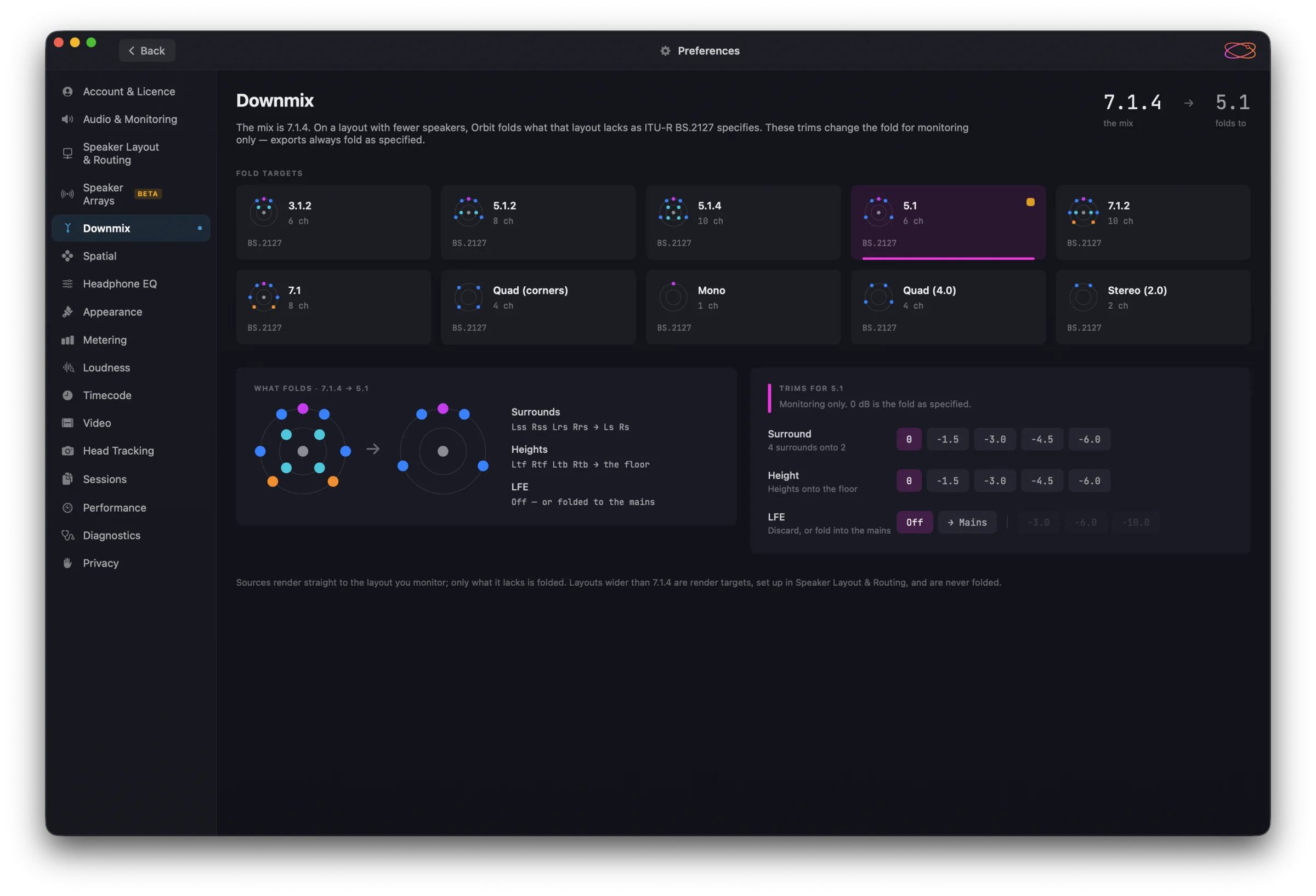
There are no coefficient matrices to manage: positions come from the speaker layouts, and only the fold levels are yours to set.
Fold targets
One card for each built-in layout narrower than 7.1.4 — 3.1.2, 5.1.2, 5.1.4, 5.1, 7.1.2, 7.1, Quad (corners), Mono, Quad (4.0) and Stereo (2.0). Pick one to edit its trims; each keeps its own. Dots on a card mark the layouts on Multichannel 1 and 2, and the header shows the fold you're editing (7.1.4 → 5.1).
What folds
A diagram of the fold, from 7.1.4 to the target, with a list of what goes where — for 5.1, the four surrounds fold onto two, the heights fold onto the floor, and the LFE is off or folded to the mains.
Trims
0 dB is the fold as specified, and every trim starts there. Each trim offers 0, −1.5, −3.0, −4.5 or −6.0 dB:
- Surround — when surround energy folds onto fewer surround speakers.
- Height — when the heights fold onto the floor.
- Centre — Stereo only: the C → Lo/Ro fold. The stereo law is Lo/Ro (a matrixed sum).
LFE — Off discards the LFE; + Mains folds it into the main channels at −3, −6 or −10 dB.
Changes apply as you make them: if you're editing the fold for the layout you're monitoring, you hear the difference straight away.
Changed in Orbit 1.5.9
Trims used to start at −3 dB. They now start at 0 dB — the fold exactly as the standard specifies — and a trim left at the old −3 dB default moves to 0 dB once. A trim you chose yourself is kept.
Wider layouts aren't folded
Sources render straight to the layout you monitor; only what it lacks is folded. Layouts wider than 7.1.4 are render targets, set up in Speaker Layout & Routing, and are never folded.
Exports
These trims are for monitoring only: exports always fold as specified, with no trims. (Before 1.5.9, an export could take your monitoring trims or a custom set; that option is gone.) See Exporting.
See also
- Monitoring Modes — how the speaker layout and monitoring mode fit together.
- Speaker Layout & Routing — choosing the two Multichannel layouts.