
Appearance
Mixer
Every output channel of a layout has a level and a mute, plus a master level. What you hear is what you export: levels and mutes are heard live and written into the file.
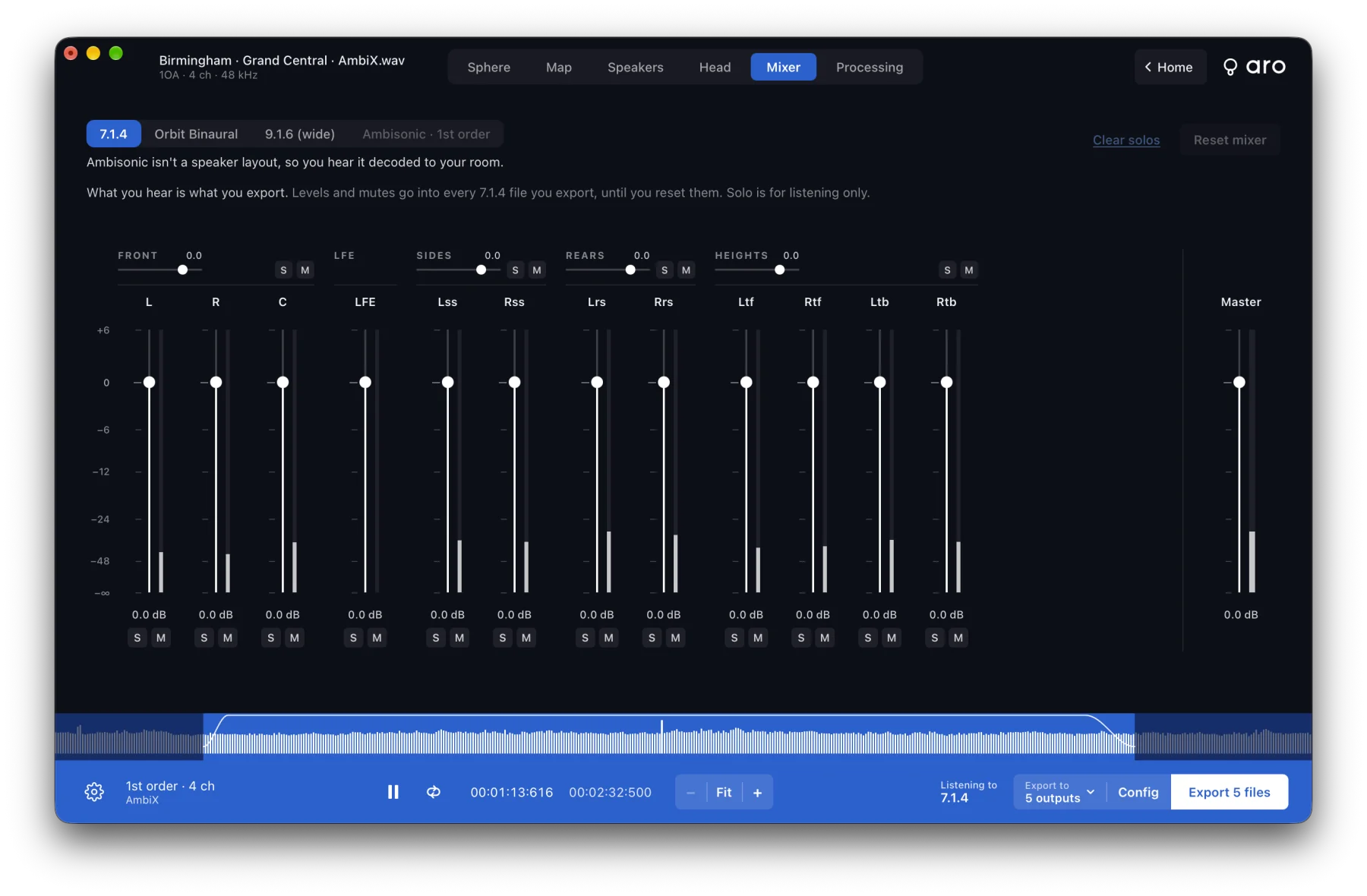
Where it is
- The Mixer tab (⌘5), beside Sphere, Map, Speakers and Head. It replaces the old mixer sidebar.
- Configuration ▸ Output ▸ Mixer, which takes you to the tab.
- The Mixer: note in the footer, when a mixer isn't at 0 dB.
- On the Speakers view, click a speaker to solo it, or ⌥-click to mute it.
Levels, mutes and solos
- Levels run from −∞ to +6 dB per channel, plus Master.
- Group faders above the channels — Front, LFE, Sides, Rears and Heights — move every channel in the group together, keeping their balance. Each group has its own S (solo) and M (mute).
- Mute silences a channel. A muted channel is exact digital silence in the file.
- Solo is for listening only and never reaches a file. Solos add up; click again to un-solo. A muted channel stays muted when soloed.
- Reset mixer puts every channel and the master back to 0 dB and clears mutes. Clear solos clears the solos.
When a mixer isn't at 0 dB, the footer says so, for example Mixer: 1 muted, 2 trimmed. Click it to open the mixer.
One mixer per layout
Each layout keeps its own mixer, and Aro remembers it. A row along the top of the tab lists every output you've ticked on the Export to page. Choose one and its mixer is the one on screen, and the one you hear while the tab is open. Picking an output under Hear it decoded to on the OUT meters chooses it here too. Leave the tab and you hear what you heard before. Your 7.1.4 mixer stays as it was while you work on 5.1.
With nothing ticked in Export to, there's no output to mix. The tab says "Choose an output to export to." and you hear your room. Solos are never saved; they clear when you open a file or change layout.
Orbit Binaural has a master level only, because it's folded from the 7.1.4 bus. An Ambisonic file has no mixer at all: it's in the row but greyed out, because it's the recording rather than a decode. An Eclipsa Audio™ file isn't in the row: it's a file, decoded to your room when you listen. With only Eclipsa Audio ticked, the tab says so. With many outputs, the row wraps onto a second line.
In the file
In an exported file the mixer comes after the decode and the LFE, and before loudness, the limiter and sample-rate conversion. With Normalise on, the master level is cancelled out by the normalise gain, but the balance between channels and any mutes still shape the file.
If a channel is muted when you press Export, Aro asks first: Export anyway, Reset mixer and export, or Back to the mixer. Batch asks the same way when any layout it uses has a muted channel.