Meters & Levels
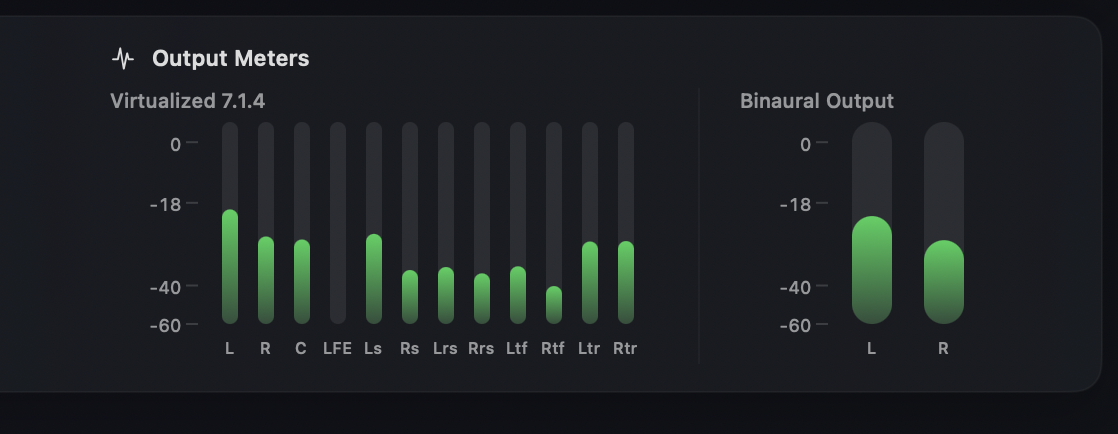
Orbit's meters help you verify that levels are healthy and the mix is behaving as expected. They adapt to your monitoring mode — showing 12 channels in 7.1.4 mode, or simple L/R meters in binaural and stereo — so you always see what's relevant to your current output.
Meter types
Meters adapt to the current monitoring mode:
- 7.1.4 mode: 12-channel metering for the full speaker layout.
- Binaural mode: Left and right binaural output meters. Enable View → Show Virtualized 7.1.4 Meters in Binaural Mode to see the underlying speaker feed alongside binaural output.
- Stereo mode: Left and right stereo fold-down meters.
All meters update in real-time during playback and scrubbing.
Loudness metering
Expand the Loudness panel in the sidebar to monitor ITU-R BS.1770 loudness measurements. Use the Source menu to choose:
- Session: Live measurements from the active monitoring output with Integrated, Short-term, Momentary LUFS, and True Peak (L/R) plus Reset.
- Programme: ADM-supplied loudness metadata (Integrated, Max Short-term/Momentary/True Peak) plus LRA and Dialogue when present. These values stay fixed for the loaded ADM.
Session measurements reflect the active monitoring output, so you can verify compliance in any mode. Use Reset to clear live measurements and restart from the current playback position.
What to check
- Peaks and clipping during loud sections.
- LFE activity only when expected.
- Bed vs object balance across the programme.
- Loudness compliance with delivery specifications.
Practical tips
- Compare meters across monitoring modes to catch translation issues.
- Use solo and mute controls to isolate problem elements.
- Reset loudness measurements when checking specific sections.
TIP
If you see unexpected peaks, revisit the same timecode in a different monitoring mode to confirm the source.
Meter scales
Change the scale via View → Meter Scale. The default is Digital Peak.
DAW-style meters
These meters show 0 as clipping (full scale):
| Scale | Range | Use for |
|---|---|---|
| Digital Peak | -60 to 0 dBFS | General DAW work |
| True Peak | -60 to +3 dBFS | Checking inter-sample peaks |
| Peak Wide | -72 to 0 dBFS | Classical/film (more dynamic range) |
Broadcast meters
These meters show 0 as nominal (reference) level:
| Scale | Reference | Use for |
|---|---|---|
| EBU R128 | -18 dBFS | European broadcast |
| BBC PPM | -18 dBFS | BBC-style broadcast |
| K-20 | -20 dBFS | Wide dynamics (film/classical) |
| K-14 | -14 dBFS | Music mixing |
| K-12 | -12 dBFS | Streaming/commercial |