
Head Tracking
When you turn your head while wearing headphones, the binaural soundstage normally moves with you — sounds that were in front shift to the side. Head tracking fixes this by compensating for your head movement, keeping the virtual speaker positions stable in space. It's like having a fixed sound field that stays put while you move.
Orbit supports head tracking via AirPods (using their built-in motion sensors) or via your Mac's camera (using face detection).
How to use it
- Switch to Binaural Headphones mode.
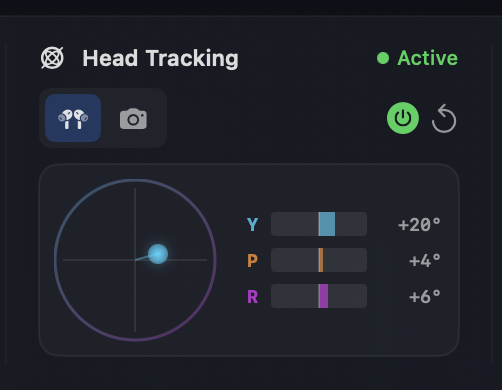
- In the Head Tracking column, choose a source:
- AirPods when AirPods are the selected output device.
- Camera to use the Mac’s front-facing camera.
- Toggle Head Tracking on and press Recenter to set a neutral orientation.
- Watch the yaw/pitch/roll readout to confirm tracking is updating.
Camera tracking tips
Nothing happening?
If you enable camera tracking but nothing happens, go to Setup → Camera Tracking Settings… and check that the correct camera is selected.
- Grant camera permission when prompted.
- Open Setup → Camera Tracking Settings… to:
- Select a camera from the dropdown (built-in front camera, external webcams, or other video devices).
- Adjust yaw/pitch/roll scaling to match your preferred tracking sensitivity.
- Preview the face detection to confirm the camera has a clear view.
- Camera tracking requires good lighting for reliable face detection.
- Keep your head centered in frame for the steadiest results.
- External webcams and USB cameras are supported - all cameras are mirrored for natural tracking.
Best practices
- Recenter after putting on headphones or changing posture.
- Disable tracking if multiple people are listening in the same room.
- Use a fixed head position when making critical judgments.
When it is unavailable
- If you are not in Binaural mode.
- If the selected source is not available (e.g., AirPods not selected as the output, camera permission denied).
INFO
Head tracking is optional. Orbit still provides binaural playback without it.